How to Integrate BlueJeans with VIDIZMO
BlueJeans is the meeting platform for the modern workplace. It brings video, audio, and web conferencing together with the collaboration tools people use every day. It helps you schedule, join, and host one-touch meetings in just a few seconds from anywhere, on any device or room system. To learn more, visit BlueJeans.
BlueJeans helps drive meeting productivity within the digital workplace through seamless integration with your favorite scheduling, messaging, productivity, and content management tools. Where BlueJeans does wonders in resolving the business pain of allowing teams to collaborate in real-time, VIDIZMO empowers such meeting solutions with its out-of-the-box content hosting, storage, and management capabilities to make the valuable discussions and ideas live forever.
Prerequisites
- Ensure that you belong to a group where the Conferencing permission is enabled to access this feature to configure the BlueJeans App.
- Make sure you have enterprise-level administrative rights in your BlueJeans account. To learn more, visit Authentication Methods for BlueJeans Meetings API Endpoints.
- Make sure you have a BlueJeans client, using which you have recorded an online meeting.
BlueJeans App Configuration
- Login to your BlueJeans account with Enterprise Administrative rights.
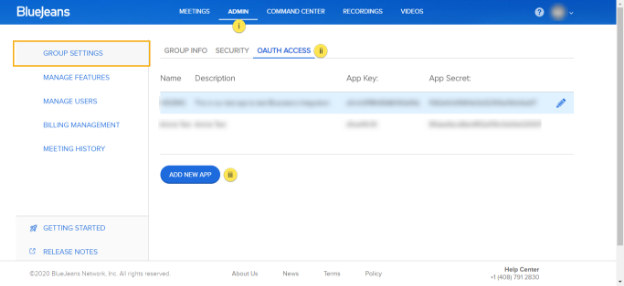
- In Group Settings, navigate to the Admin panel to get the App and Secret Key which will be used in the VIDIZMO Configuration section.
- Select OAUTH ACCESS.
- Select ADD NEW APP.
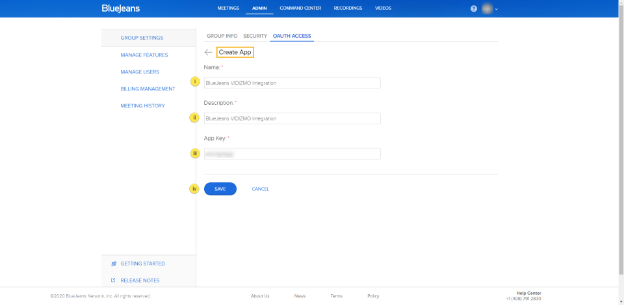
- On the Create App page:
- Give your app a suitable Name.
- Write a Description of your app.
- Enter an App Key (this is a user-defined key).
- Select Save.
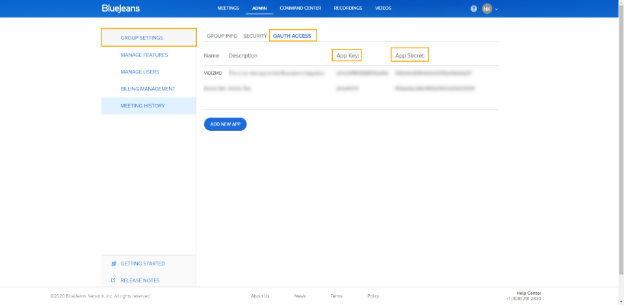
- Navigate back to the OAUTH ACCESS page and copy the App Key and App Secret. Keep these two keys in a safe place, as they will be used in later steps to authorize VIDIZMO to communicate with BlueJeans to fetch your recorded meetings.
VIDIZMO Configuration
-
Open the navigation menu via the button on the top left.
-
Select the Admin dropdown.
-
Select Portal Settings.
-
Select Apps.
-
Select Video Conferencing.
-
Select the settings icon on the BlueJeans app.
-
In the BlueJeans - Settings dialog, configure the following:
-
Client ID Paste the App Key value copied in step 3 of the BlueJeans App Configuration.
-
Client Secret Paste the App Secret value copied in step 3 of the BlueJeans App Configuration.
-
Filter Accounts Specify comma-separated email addresses of BlueJeans users against which meetings should be fetched. Only users associated with the emails will receive the meeting recordings.
-
Concatenate Recordings Enable this check to stitch recordings of a single meeting (ID) together.
-
Delete Conference Recordings Enable this to delete recordings from your Cloud Storage after successful upload to VIDIZMO Portal.
NOTE: Be careful while enabling the check for deletion, since all cloud recordings against the selected users will be permanently deleted with no chance of restoration in the BlueJeans account. However, they can be downloaded from your VIDIZMO Portal.
-
Publish As Select Me if you wish to publish all BlueJeans recordings against your author name in the portal, otherwise select BlueJeans User to publish it against the user who initiated the recording.
-
Publishing Status Choose how you want to publish your meeting recording via an automated workflow. Select Published if you want your recordings to be published directly on your portal. Otherwise select Drafted, in which case the recordings will go into the drafts folder of the associated VIDIZMO portal and you will have to publish them yourself.
NOTE: The status of your media depends on the default publish settings of the portal. For example, if Content Moderation is on, then every BlueJeans recording's status set to "Published" will have to be first approved by the Moderator before it gets published on the Portal. The same applies to a draft when it is published. Learn more about it in Understanding Content Moderation.
-
-
Select Save Changes.
-
Turn on the BlueJeans app by enabling the toggle.
NOTE: Only recordings will be fetched from BlueJeans without any chat and transcription.